Guide
Reading a TunnelVision report: score, indicators and verdicts
A TunnelVision report doesn't tell you who cheated. It tells you which mining sessions deserve your time, and why. This guide shows how to read one in a few minutes, from the overview to checking in game, with screenshots of a real report: the anonymized demo (its interface is in French).
1. Start with the overview
The Vue d'ensemble (overview) button sums up every session in the report. On the left, the distribution of scores: on a real server, the overwhelming majority of sessions pile up near 0, and only a few stand out on the right. On the right, each dot is a session, placed by its score (horizontal) and its distance from the corpus (vertical); clicking a dot opens the session.
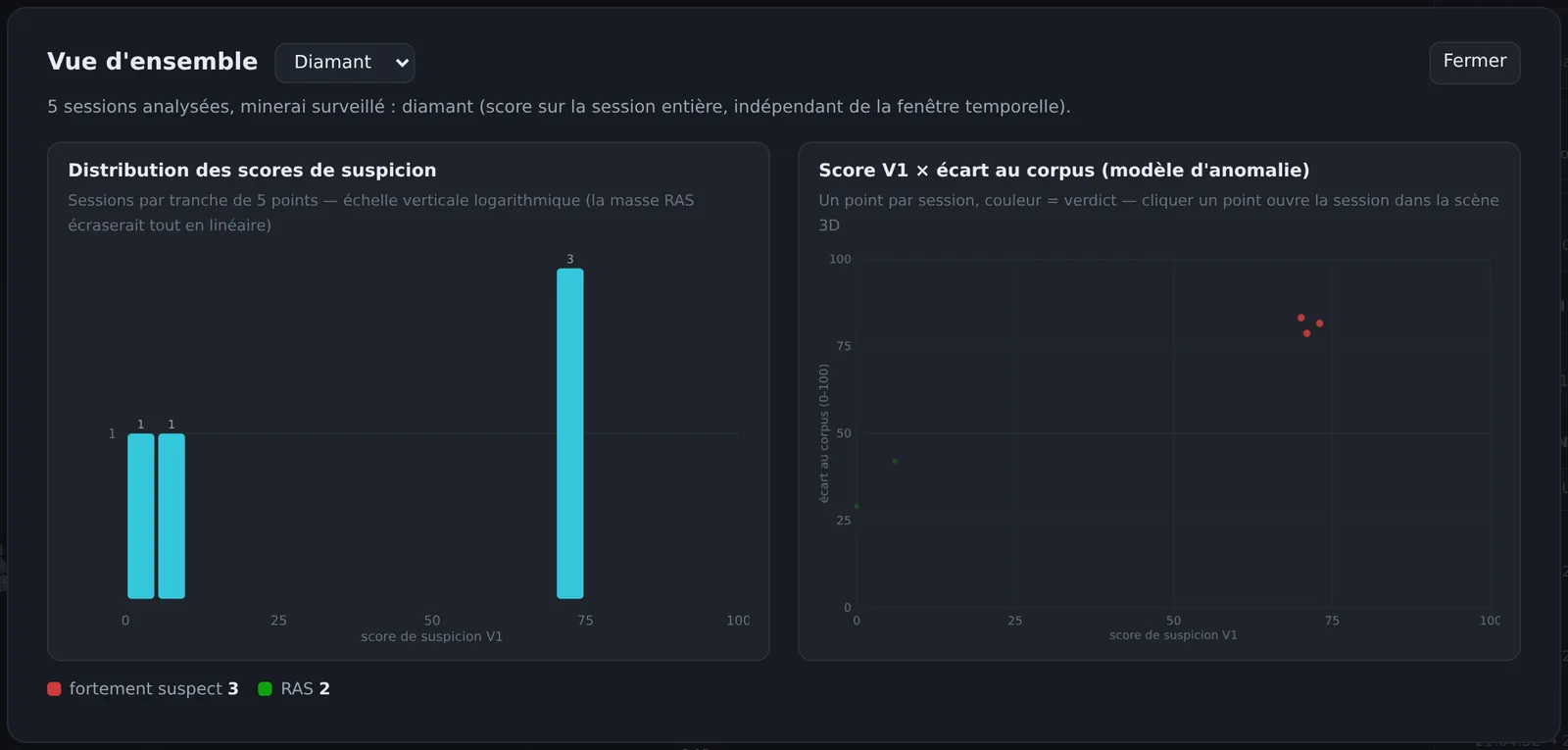
Start with the top-right corner: a high score that the anomaly model also finds atypical means two independent views pointing at the same place.
2. The session ranking
The ranking, in the right-hand panel, sorts sessions by score. It can also sort by distance from the corpus, by yield of the tracked ore, by number of blocks or by duration, and search for a specific player.
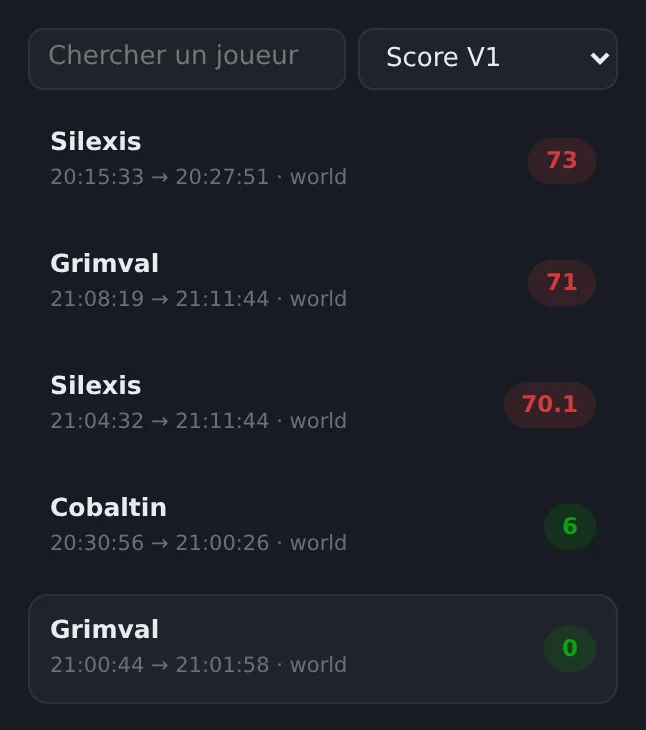
Sorting by yield is raw data, not a verdict: a player who stumbled on a big vein will top it without cheating. It's there to go back to the facts when the score seems too lenient to you.
3. The score and its verdict
Every session gets a score from 0 to 100 and one of three verdicts:
- RAS (nothing to report, under 30): nothing in this session needs particular attention.
- À surveiller (worth watching, 30 to 59): something is out of the ordinary. Look at the scene, and conclude nothing more.
- Fortement suspect (highly suspicious, 60 and above): several signals converge. This is where a full check is worth it.
A score decides nothing: it sorts. Even a 90 calls for a human check before any sanction, for the reasons detailed in why a suspicion score should never be enough to ban.
4. The indicators, one by one
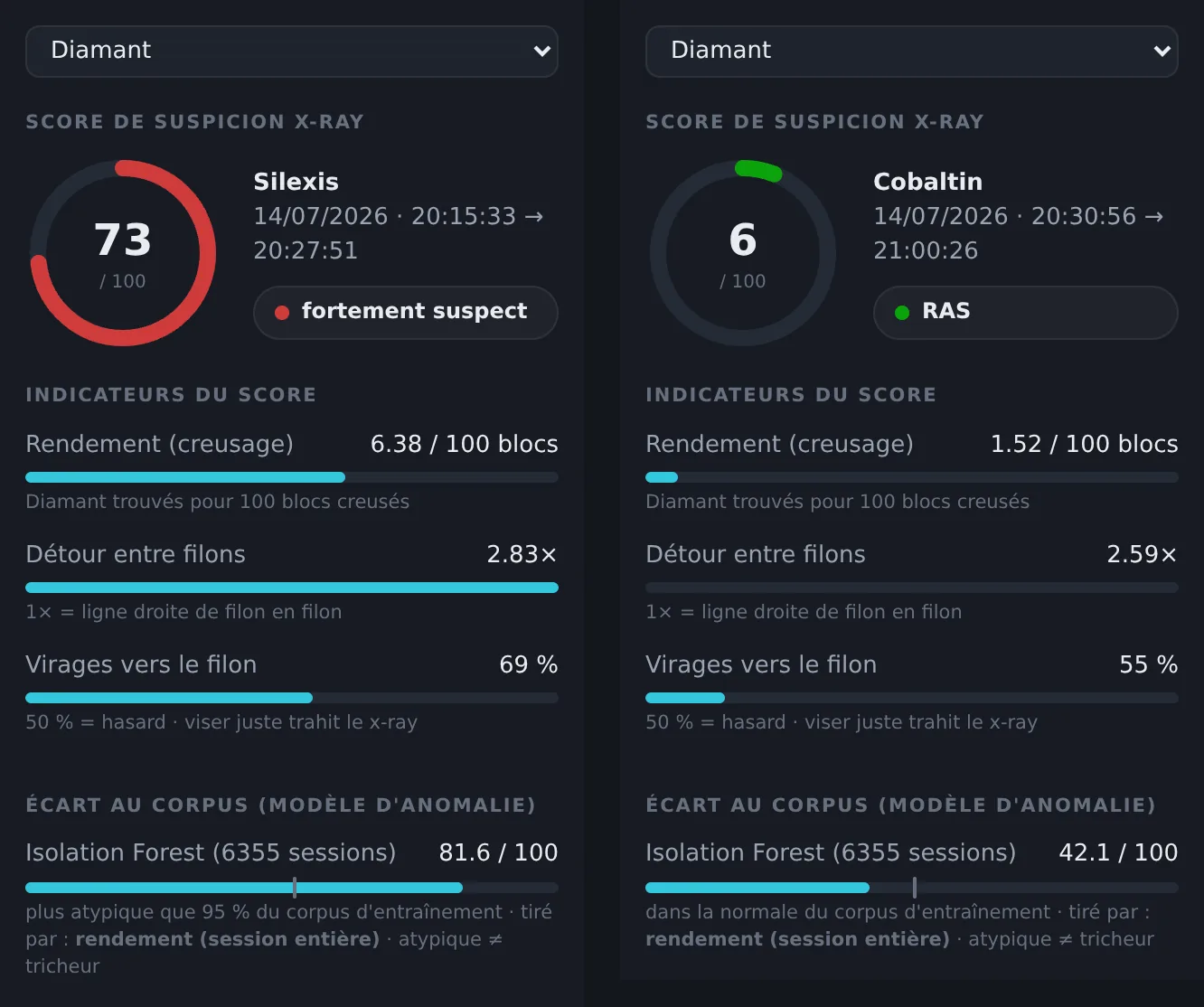
Under the score, each indicator shows its value on the right and a gauge below it. The value is the raw measurement; the gauge shows how much this indicator weighs in the score.
- Rendement (creusage), yield while digging: tracked ores found per 100 blocks dug. Only digging counts: an ore picked up while walking through a cave, already visible, isn't part of it. It's the most direct signal, a yield that luck can't explain.
- Détour entre filons, detour between veins: the length actually mined between two veins, divided by the straight-line distance. 1× would be a perfect line. An honest miner grids the area and runs into veins by chance; an x-rayer goes almost straight from one to the next.
- Virages vers le filon, turns toward the vein: at each change of direction, does the new direction bring the player closer to the next vein? 50 % is chance; aiming right almost every time gives away information the player shouldn't have.
Look at Cobaltin's detour above: 2.59×, but an empty gauge. The value is computed, but from a single pair of veins: too little to be reliable, so the indicator is left out of the score. A dash ("—") instead of a value means it couldn't be computed at all.
Two safeguards are worth knowing to read a score correctly. First, yield alone is never enough to reach "highly suspicious": at least one other indicator has to back it up. Second, in a corridor dug in a straight line, the trajectory indicators are left out: digging straight ahead isn't aiming, and a vein sitting on the line proves nothing.
5. Distance from the corpus: a second opinion
Under the indicators, the écart au corpus (distance from the corpus) comes from a model entirely independent of the score: it learned what a typical session looks like from thousands of real sessions, and measures how far this one strays from it. Above 50 (the mark on the bar), the session is more atypical than the vast majority; the "tiré par" (driven by) note says what makes it atypical.
Atypical doesn't mean cheater: a building session, a player clearing out a huge cave, a server event can all be out of the ordinary. This view is mostly there to confirm a high score (Silexis: score 73, distance 81.6) or to flag an odd session the score doesn't see.
6. The 3D scene: what doesn't lie
The numbers tell you where to look; the scene shows what happened. Every broken block sits at its real coordinates, ores in colour, and a line links the blocks in the order they were broken: that's the player's path.
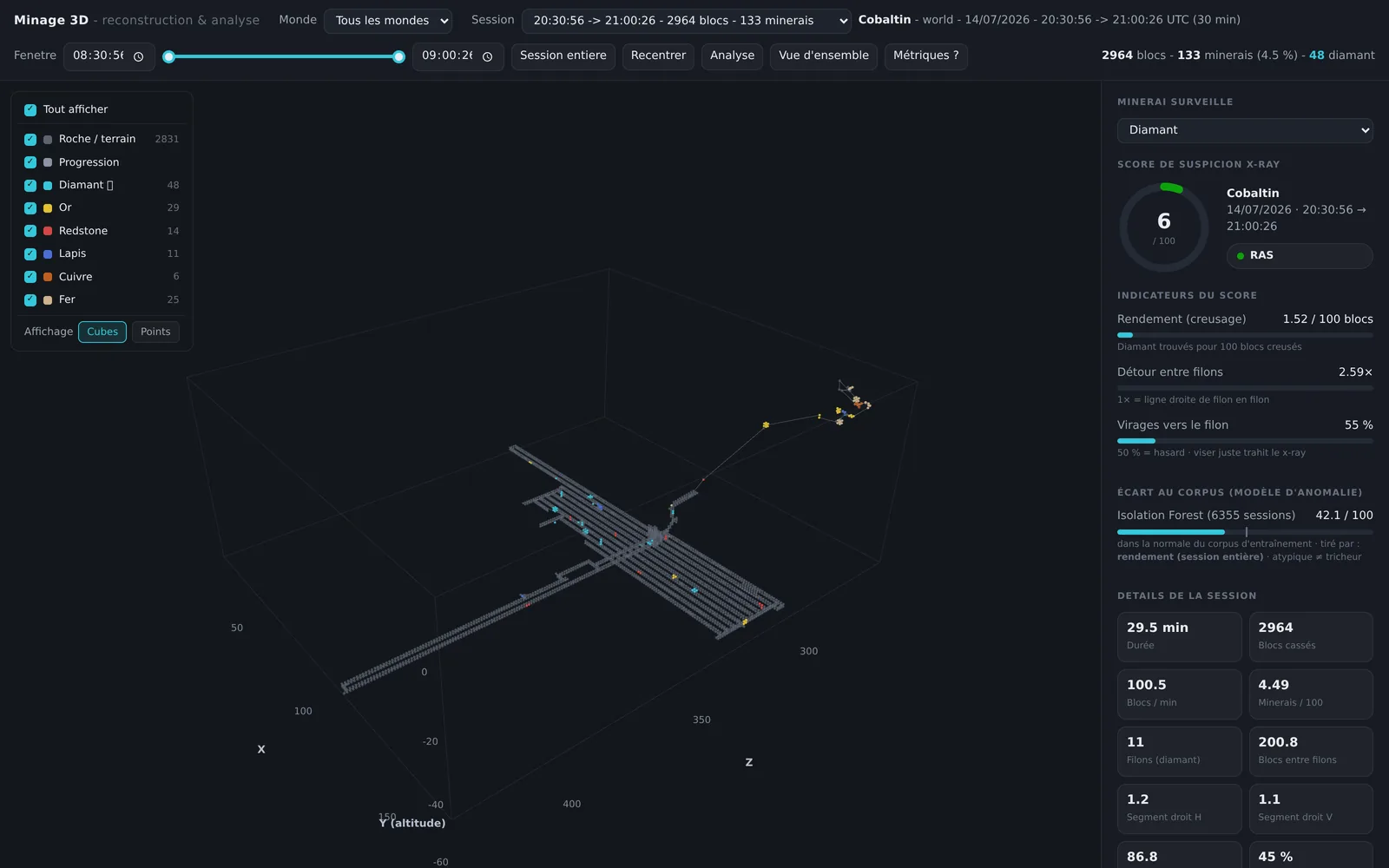
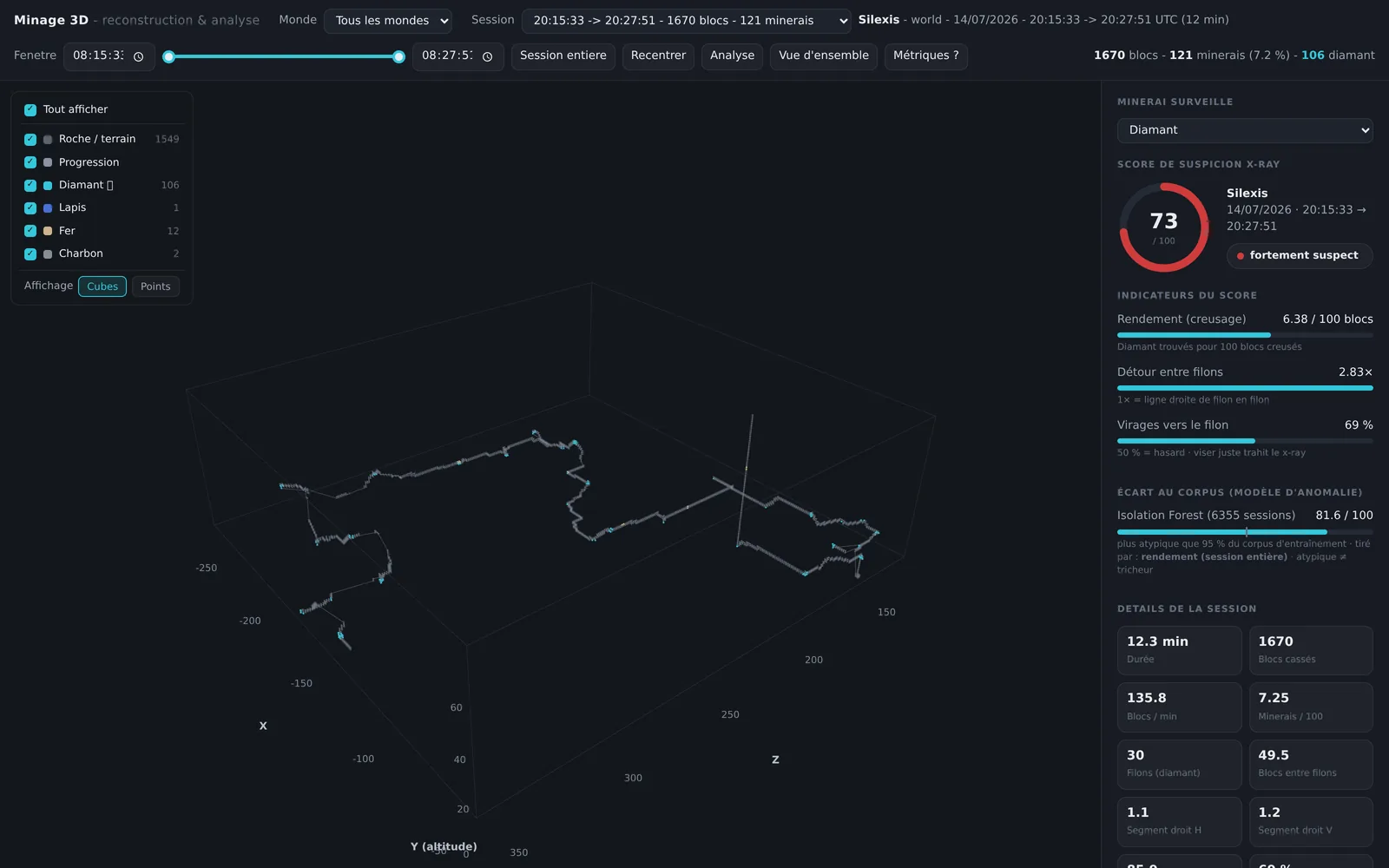
A few tools in the scene save a lot of time:
- The time window, at the top, narrows the scene to part of the session: handy to isolate the moment of a diamond spike. It doesn't change the score, which always covers the whole session.
- Hovering a block shows its type and the time it was broken; hovering the line between two blocks shows the distance and time elapsed, which tells movement apart from digging.
- Copier /tp (copy /tp), in the panel, puts a teleport command to the area in your clipboard, to go and see for yourself.
7. Special cases
A session that's too short
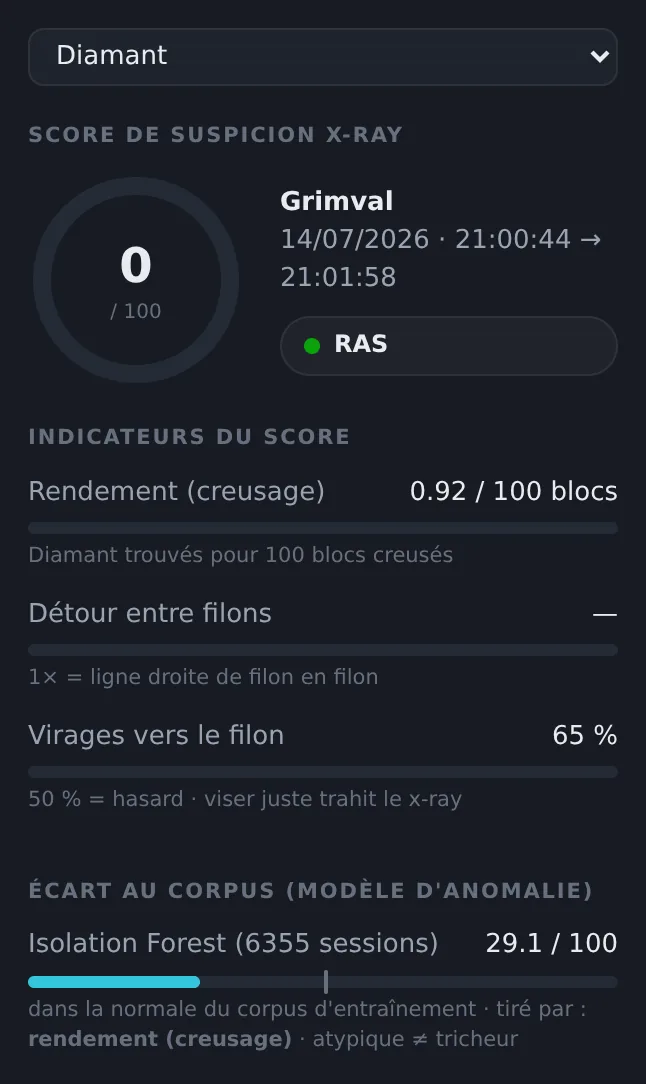
With few blocks and few veins, the indicators lack material. A clean verdict on a short session clears nobody: look at all of the player's sessions instead.
A cave session
In caves, an honest player picks up a lot of ore that's already visible: the score accounts for this with adapted thresholds, and is deliberately cautious. To understand why, and what really sets an explorer apart from a cheater in caves, see false positives in caves and the test that still works in caves.
A careful cheater
A player who only cheats in short bursts can drag down the average of a long session. Hence the time window, and the article on occasional x-ray.
8. From alert to decision
- Spot the sessions in the top right of the overview, or at the top of the ranking.
- Read which indicators drive the score, and on what basis (an empty gauge doesn't count).
- Look at the path in the scene: a grid, or a tunnel running from vein to vein?
- Compare with the player's other sessions: a repeated pattern weighs more than a one-off.
- Check in game, with Copier /tp and the CoreProtect commands from the full investigation method.
- Decide yourself. The report did the sorting; the decision stays with your team.
Key points
- Start with the overview: a high score on an atypical session is where to look first.
- A verdict is a level of attention, not a conclusion.
- Read the gauge as much as the value: an indicator without enough evidence is left out of the score.
- Yield alone never leads to "highly suspicious".
- The path in the 3D scene is what convinces, one way or the other.
Try it on your server
TunnelVision rereads the CoreProtect history your server already records and produces this report, session by session, with the indicators behind each score. The demo above is a real, anonymized report.